Discipline without paperwork
Configurable approval chains for breakdowns, requisitions, vendor quotes and closures — with amount thresholds, severity variants, escalation timers, and an immutable audit trail exportable for ISO.
What AssetAI does
Chains you control
Per document type, per role, per amount. Enable only what your plant needs.
Escalation timers
Pending approvals re-alert automatically. Delay becomes visible, not silent.
Immutable audit CSV
Who approved what, when, with remarks — evidence your ISO auditor accepts.
Closure inspection
Optionally require sign-off before a completed job closes — quality gate built in.
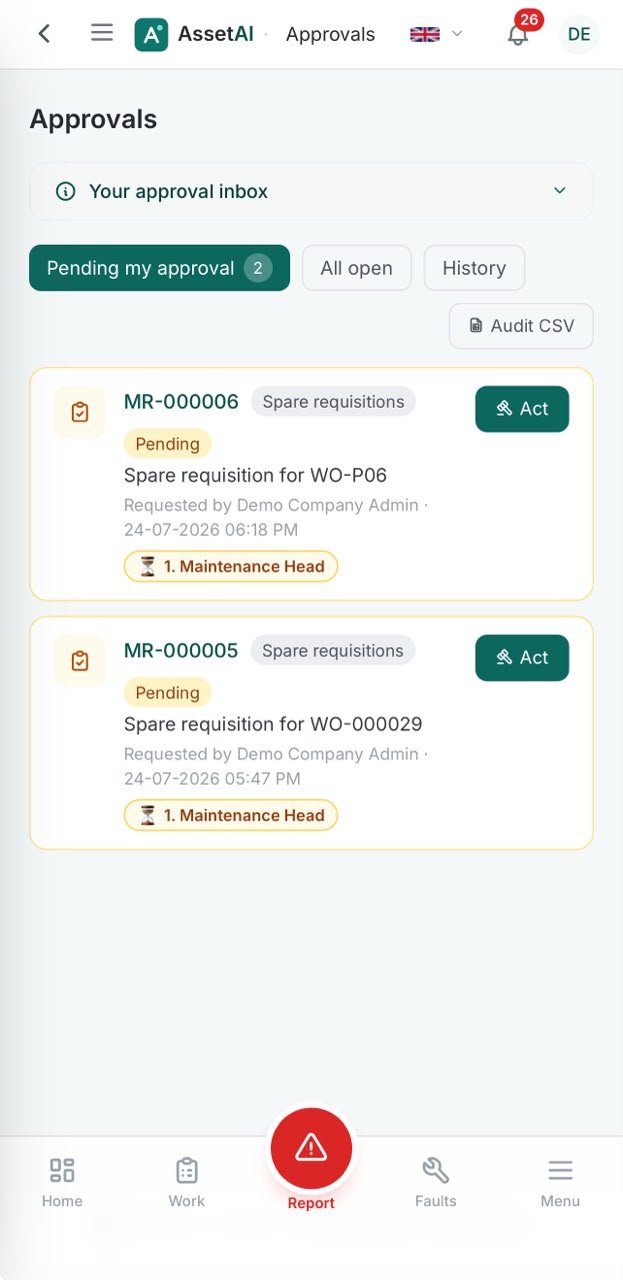
Approvals with coverage context and best-technician suggestion — on mobile.
Approvals only work as a control if they're enforced in the system itself, not treated as an assumption everyone hopes gets followed. The sections below cover what AssetAI does not try to be — a configurable workflow engine — and why that fixed-gate design still holds up for Indian manufacturing plants that need clean records for internal review, customer audits, or ISO-aligned quality systems.
What Gets Enforced in Code, Not Just Policy
Two checks in AssetAI aren't optional steps someone can skip under deadline pressure — they're written into the work order logic itself:
- A breakdown (BM) or corrective (CM) work order cannot be marked Completed or Closed without a failure cause and a failure remedy recorded against it. This is enforced in two separate code paths, so it applies whether the work order was closed by a technician on the floor or by a planner reviewing it later.
- Inspection closures require a named approval step — Planner inspects, Maintenance Head closes — and a rejection doesn't just bounce the work order back to In Progress silently. It appends an "Inspection returned: ..." note, so the next person to open the record sees exactly why it came back, without needing to track down whoever made the call.
This matters more than it sounds: on paper-based or register-driven maintenance, failure cause and remedy fields are the first thing that gets left blank when a shift is short-staffed. Making them mandatory at the code level, not just a form suggestion, is what turns a maintenance log into a usable failure history — the same history that feeds root-cause analysis and, over time, OEE calculations.
Why Fixed Gates Beat an Unbuilt Chain
AssetAI does not offer configurable multi-level approval chains, and nothing in the system routes based on a cost threshold — there's no field that reads an amount and decides who approves next. That's a deliberate scope decision, not an oversight, and it's worth understanding if you're evaluating this against a CMMS that markets itself around workflow builders:
- Fewer places to misconfigure. A chain builder is powerful, but it's also one more thing to design, test, and maintain as roles change — and it's an easy way for an approval step to quietly get bypassed if someone edits it wrong.
- The severity rule is the one routing exception, and it's intentional. Emergency breakdowns skip approval by design, because the alternative — a line down while someone waits for a sign-off — is worse than skipping a checkpoint.
- Everything else runs through the same fixed points, so an auditor, plant head, or new maintenance lead can learn the approval model once and expect it to hold across every work order, every time, rather than checking which chain variant applies to which asset class.
If your plant's approval needs go beyond these fixed points — say, a purchase-order chain tied to spend limits — that's a conversation worth having directly; see the full feature set or book a demo to walk through where the boundaries sit before you commit.
Illustration of the approval chain — not an actual screenshot.
The moment a breakdown gets logged or a work order moves toward closure, someone with authority needs to sign off before work starts or a job is marked done. AssetAI builds this into the work order lifecycle itself — New, Approved, Assigned, In Progress, On Hold, Completed, Closed, Cancelled — rather than leaving it as a side process tracked in registers or WhatsApp threads.
How the Fixed Approval Gates Work
Every breakdown report submitted on the shop floor sits in a queue until it's approved — approval pre-fills the title, priority (pulled from the reported severity), responsible party, and schedule date, so the person approving isn't retyping what the technician already reported. The one exception is deliberate: Emergency-severity breakdowns skip the approval step entirely and raise a work order the instant they're submitted, because a line-down event shouldn't wait on a sign-off.
Inspection-type schedules carry a second, separate gate. Completing an inspection work order doesn't close it — it opens a "Work order closure (inspection)" approval, typically routed so a Planner inspects and a Maintenance Head closes. If that closure is rejected, the work order doesn't just bounce back silently: it returns to In Progress with an appended "Inspection returned: ..." note, so the reason for rejection stays attached to the record permanently instead of living in a side conversation.
Breakdown (BM) and corrective (CM) work orders have a stricter rule enforced in code, not policy: they cannot be marked Completed or Closed without a recorded failure cause and failure remedy. This is checked on two separate paths in the system, so it can't be skipped by closing from a different screen.
External Repairs Follow Their Own Trail
When equipment goes out for third-party repair or service, AssetAI tracks it through a fixed status trail — Requested, Visited, Quoted, Quote Approved, In Service, Completed, Billed, Bill Passed, Closed, with Cancelled as an exit at any point. Each transition is timestamped, which matters when a vendor invoice needs to be reconciled against when the quote was actually approved, or when a plant needs to show an auditor exactly how long a machine sat waiting on a vendor visit.
Reading the Trail Later
None of this is useful if it can't be pulled back out. Because every status change, approval, rejection note, and failure cause/remedy sits on the work order record, the same data that satisfies a shift supervisor also satisfies an ISO auditor or a TPM review — without a parallel paperwork trail to maintain. If you're documenting a maintenance management system for the first time, the What is a CMMS glossary page covers how this lifecycle concept fits into the broader picture, and the industries page shows how it plays out across different plant types. To see the approval and closure gates against your own breakdown and inspection workflows, book a demo and bring a recent audit finding — we'll walk through how it would look in AssetAI.
Approvals, Escalation & Audit Trail FAQs
How do I stop maintenance staff from marking a breakdown repair as done without telling me what actually failed?
AssetAI enforces a failure cause and failure remedy field on every CM (corrective maintenance) work order before it can be marked complete or closed. The system blocks closure until both fields are filled in code. When a technician tries to close the work order, they must enter what broke and how you fixed it—there is no workaround or skip button. This creates an audit trail where every repair is traceable to its root cause, which is essential for preventive maintenance planning and equipment history.
Can I set up a multi-step approval where the planner approves first, then the maintenance head, then the shift supervisor?
No, AssetAI does not support configurable multi-level approval chains. What it does offer is a single approval gate: submitted breakdown reports move to an "Approved" status before becoming a work order, and inspection-type work orders have a separate closure approval step. If you need supervisor sign-off at multiple stages, you would need to design that workflow within your existing team hierarchy and use work order notes to track manual approvals outside the system.
Why would I want a separate approval just for closing an inspection task?
Inspection work orders carry a closure gate because the outcome—what the inspection found—is as important as the work itself. When an inspection is completed, it opens a "Work order closure (inspection)" approval that a Planner or Maintenance Head can review before it closes. If the findings are incomplete or incorrect, the inspection is rejected and sent back to In Progress with the reason appended to the work order note, so the technician knows exactly what to re-check. This ensures inspections are thorough before they are locked into your maintenance record.
What happens if a breakdown is so urgent I can't wait for approval?
Emergency-severity breakdowns bypass the approval step entirely. When you submit a breakdown report with emergency severity, AssetAI raises the work order immediately without waiting for approval—it goes straight to "Approved" status. This is the only built-in severity-based routing rule in the system, designed so that critical equipment failures trigger work orders without delay while still maintaining an audit trail of when the breakdown was reported and actioned.
If we use an external repair company, how do I track what they've done and when?
External repair and service calls run through a fixed status trail: Requested → Visited → Quoted → Quote Approved → In Service → Completed → Billed → Bill Passed → Closed, plus Cancelled. Each transition is timestamped and locked in sequence. You cannot jump steps or backdate transitions, so you have a clear chronological record of when the vendor arrived, when you approved their quote, and when the service was finished and invoiced. This creates accountability and helps you verify standards compliance if audited.
Where can I see the complete history of who approved or rejected each work order?
The audit trail is embedded in every work order record—each approval, rejection, and status change is timestamped and recorded. If an inspection is rejected, the reason is appended as a note on the work order so it travels with the record. You can review this history within each work order to see who took action and when. For a full overview of your approval workflows and how they fit into your CMMS, see /features or book a demo to walk through a live example.
Can I require photos or failure codes before a technician can close a maintenance task?
Yes. Set up mandatory fields in your approval workflow—technicians must attach photos or select a failure code before submission. The approver sees these attachments and can reject incomplete submissions. This prevents vague closure reports and ensures root cause documentation for work order history tracking.