PM schedules that actually happen
Time-based or meter-based plans per machine with task checklists. Due schedules raise work orders automatically overnight, technicians get job sheets with safety and tool lists, and PM on-time % is tracked without anyone maintaining a register.
What AssetAI does
Time & calendar based
Every N days/weeks/months, anchored to your plant calendar. Backlog is visible, never silent.
Usage-based (run-hours)
Service every 250 run-hours, not every 30 days. Readings arrive by screen, meter photo (AI reads the dial) or WhatsApp.
Task checklists on the job sheet
Clean, grease, check — printed with LOTO/PPE requirements and tools so the fitter carries everything in one trip.
PM compliance KPI
On-time completion percentage per machine and per month — the number an auditor or customer asks for first.
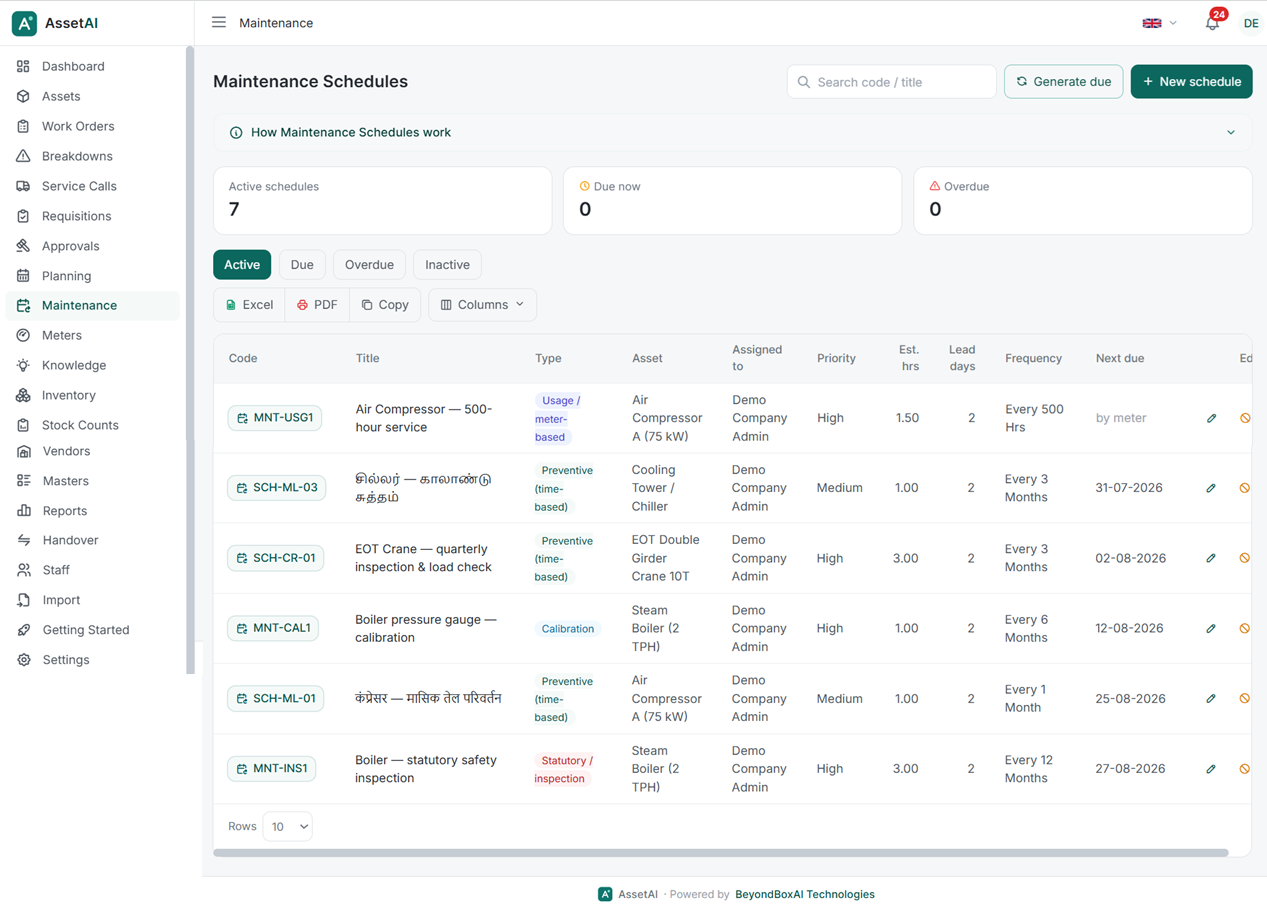
Preventive, predictive, calibration and lubrication schedules — with task checklists and required spares.
Preventive maintenance only works if the schedule keeps itself alive without a planner chasing dates in a spreadsheet — that's the core mechanical problem AssetAI's PM module is built to solve for Indian manufacturing plants running fixed servicing, lubrication, and statutory inspection intervals.
How the schedule actually runs
PM schedules in AssetAI are one of six maintenance types you can configure on a single form, but PM itself always runs on a time basis — every N days, weeks, or months from a start date you set once. There's no continuous scheduler watching the clock: a single daily batch job at 06:00 scans every tenant and raises work orders for all schedules that are due, and a manual "Generate due" button lets you force the same check on demand — useful right after go-live or when validating a new schedule. A lead-time-in-days field pulls the due window forward so the work order lands in the queue before the actual due date, giving planners a buffer to plan parts and labour rather than reacting on the day itself. Once a work order is generated, the next due date rolls forward automatically — the schedule perpetuates itself and nobody has to reset a register or a spreadsheet formula.
It's worth being precise about what this module does not do: it doesn't read sensor or vibration data to trigger a job (that's the separate condition-based/predictive type), and it doesn't auto-assign technicians or reserve spare parts when a PM work order is created. Parts, services, and labour are added to the generated work order the same way you'd add them to any other job. If you're evaluating what a CMMS is meant to cover versus what's out of scope, our What is a CMMS glossary entry lays out the boundaries plainly.
Where checklists come from — and where they go
The task checklist on a PM schedule is stored as free-text lines, saved as a JSON array, and copied as-is into the work order description at generation time — nothing is recalculated or reformatted, so what a planner writes is exactly what the technician sees. Over time, that checklist doesn't have to be built from scratch every time: fix steps captured in Knowledge cards from earlier breakdowns can be promoted directly into an asset's PM checklist, with duplicates automatically skipped, so recurring failure fixes get folded into preventive routine rather than staying buried in a resolved ticket.
This is a static checklist by design — there's no interactive tick-box execution inside the work order — but it travels with the job on the printed sheet alongside the asset's linked Safety Measures and Tools, giving the shop floor a paper-based sign-off trail even where digital adoption on the floor is partial. For plants formalising this against ISO or TPM practice, that combination of a task list plus a documented safety/tools checklist is usually the minimum audit expectation, and our ISO & standards page covers how PM records map to common certification asks.
Compliance visibility without a register
PM compliance is one of four fixed 30-day KPIs on the company dashboard, colour-toned green once it crosses 90% — a single number a plant manager or a multi-site head can check without asking each shift supervisor for a status update. There are no push notifications or SMS/email nudges for due PM in this module; visibility comes from the daily generation job populating the work order queue and from that dashboard KPI, which suits plants moving off paper registers where the discipline was already manual. If you're comparing this against how OEE or broader plant KPIs are tracked, or want to see the PM module alongside asset registers and breakdown workflows, the full features list and industries page cover how it fits a typical Indian manufacturing shop floor — or you can book a demo and run it against your own PM registers directly.
Illustration of the preventive-maintenance schedule — not an actual screenshot.
What preventive maintenance doesn't cover
PM is one of six maintenance types AssetAI supports, and it's deliberately scoped narrow. It runs on a time basis only — it does not trigger off vibration readings, temperature trends, or any other sensor input; that's handled by the separate condition-based/predictive type, and the two are configured independently even though they share the same schedule form. PM also doesn't auto-assign technicians or load-balance who picks up a generated work order — someone still decides who works the job. It doesn't reserve or issue spare parts automatically either; parts, services, and labour get added to the work order the same way you'd add them to any other job type. And unlike breakdown (BM) and corrective (CM) work orders, closing a PM work order isn't gated on entering a failure cause or remedy — there's no failure to explain on a job that ran on schedule. Knowing these boundaries matters when you're deciding what to configure as PM versus what belongs in a condition-based or corrective workflow; see the full breakdown on /features or read what a CMMS actually does if you're still mapping maintenance types to your plant's reality.
Common mistakes plants make moving off paper registers
Most Indian manufacturing plants adopting a CMMS for the first time carry over habits from their paper PM register, and a few translate badly:
- Writing checklists as vague reminders instead of tasks. "Check motor" on a paper card is fine when a supervisor explains it verbally; on a printed job sheet it's not enough. Checklist lines are stored as free text and copied verbatim into the work order, so the wording you type is exactly what the technician reads on the floor.
- Ignoring lead time. Without a lead-time-in-days buffer, the work order appears on the due date itself, leaving no runway to arrange parts or a shutdown window — set it wide enough to actually plan the job.
- Expecting a notification to chase people. PM visibility comes from the daily 06:00 generation run and the dashboard, not push alerts or SMS — someone still needs to check the queue or the compliance KPI regularly.
- Skipping statutory and safety linkage. Assets tied to statutory inspection intervals or safety equipment should have their Safety Measures and Tools lists populated, since these render separately on the printed job sheet as a sign-off checklist — a common gap when schedules are copied over quickly during onboarding.
Where PM sits in a broader maintenance strategy
Preventive maintenance is the backbone of most TPM programs, and PM compliance — one of the four fixed 30-day KPIs on AssetAI's dashboard — is usually the first number plant managers track when moving off spreadsheets, since it turns green at 90% and above without anyone maintaining a separate register. It's not the only lever on uptime, though: PM discipline feeds directly into OEE, and plants working toward ISO-aligned maintenance practices typically layer condition-based triggers and corrective-action tracking on top of a solid PM base rather than relying on PM alone. If you're comparing how this fits your sector, browse industries and use-cases, check pricing, or book a demo to see PM scheduling run against your own asset list rather than a slide deck.
Preventive Maintenance Software FAQs
How do I set up a preventive maintenance schedule that runs automatically without me having to manually create work orders every month?
Create a single schedule record with a time basis (every N days, weeks, or months), and AssetAI generates the work order automatically at 06:00 each day for any due schedules across your plant. The next due date rolls forward on its own after each generation, so the schedule perpetuates without manual reset. You can also trigger generation on demand with a "Generate due" button. This way, preventive maintenance runs on autopilot once configured—your team receives work orders only when they're actually needed, not as a constant manual planning task.
Can I make PM work orders appear a few days before the actual due date so my technicians have time to prepare?
Yes—the lead-time-in-days field on the schedule pulls the due window forward, so the work order arrives before the actual maintenance is due. This gives your team advance notice to plan materials, coordinate downtime, or arrange asset access without rushing into the job. The checklist and safety measures are inherited from the schedule, so technicians see exactly what they need to do the moment the work order appears.
What information do technicians see on the actual PM job sheet when they go to do the work?
The generated work order inherits the checklist from your schedule as bullet-point steps in the job description, so the technician sees the maintenance steps on screen. The printable job sheet separately renders the asset's linked Safety Measures and Tools as a paper checklist with sign-off lines, so your team has both digital and physical guidance on-site. This ensures nothing is missed and compliance is documented for each job.
How does AssetAI track whether we're actually doing preventive maintenance on time?
PM compliance is tracked as one of four fixed 30-day KPIs on your company dashboard, colour-coded and shown green when you're at 90% or above. This gives you a daily snapshot of whether schedules are being completed within their due windows. Combined with work order history, you can see which assets or teams are falling behind and adjust resources or training accordingly.
Can I pull maintenance steps from our knowledge base directly into an asset's PM checklist instead of typing them in manually?
Yes—fix steps from Knowledge cards can be promoted directly into an asset's PM checklist, and the system skips duplicates so you don't end up with repeated tasks. This lets you build robust PM checklists from proven procedures without retyping, and you can refine them over time as your team documents better methods. You can learn more about how all features work together to support your maintenance planning.
Does the software trigger preventive maintenance based on sensor readings or equipment condition instead of just a calendar date?
No—preventive maintenance in this module runs on a time basis only (every N days, weeks, or months from a start date). If you need condition-based or sensor-triggered maintenance, AssetAI supports meter-based schedules that generate on equipment counters, but real-time sensor thresholds are handled separately. For details on all available maintenance types and scheduling options, or to discuss your specific needs, you can book a demo with our team.
If a machine breaks down before its scheduled PM, does AssetAI automatically reschedule the remaining preventive maintenance tasks for that equipment?
No—breakdowns don't auto-reschedule existing PMs. You'll need to manually adjust the next PM date in AssetAI to avoid overlapping maintenance windows. We recommend marking the breakdown as a corrective work order, then reviewing your preventive maintenance intervals to see if they need adjustment based on failure patterns.