A store that can face an audit
Spares with bins, min levels and preferred suppliers. Issues happen against approved requisitions from work orders, every movement hits an immutable ledger, and part costs land on the work order automatically.
What AssetAI does
Requisition discipline
Technician raises from the WO → approver sanctions → storekeeper issues. No verbal issues, no leakage.
Immutable stock ledger
Receipts, issues, returns and adjustments — never edited, only reversed. Your auditor will approve.
Reorder suggestions
Items below minimum surface automatically with preferred supplier and last price.
Cycle counts
Count sheets by category/bin; variances post as adjustments with reasons.
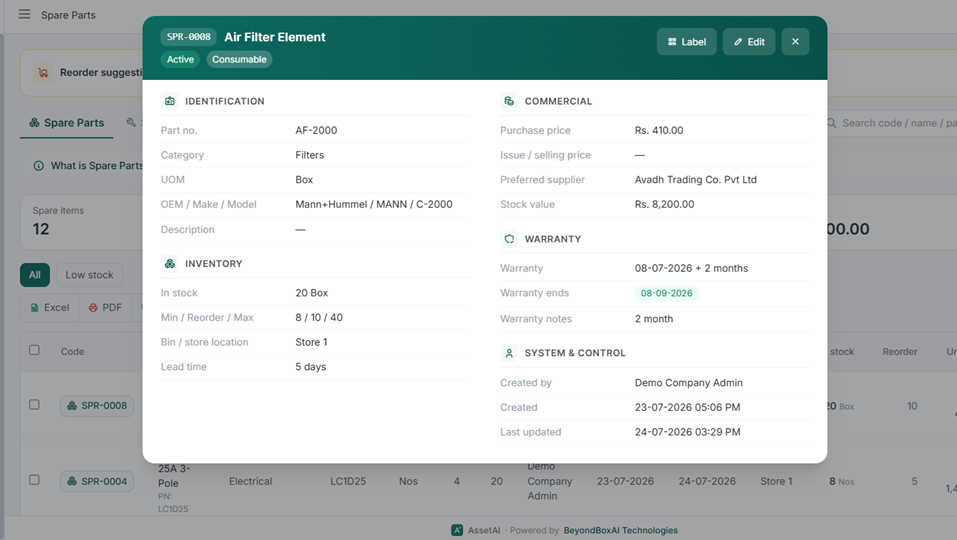
Spare parts with stock levels, reorder alerts, OEM / make / model and stock value.
Spares don't live in a separate silo inside AssetAI — every part consumed on a job is a cost line on that job's work order, computed the same way every time. That single design choice changes how plants in India think about parts spend, reorder signals and root-cause discipline, without requiring a separate inventory module to reconcile against maintenance records.
Three Cost Lines, One Formula
A work order in AssetAI can carry three kinds of cost lines — parts, outside services and labour — and all three price using the same logic: qty x unit cost x (1 - discount%). Services pull their base rate from the Service master, labour costs from the technician's hourly rate, and parts from the unit cost entered on the line. There's no separate pricing engine for spares that a planner has to reconcile against the job record later.
Practically, this means:
- A breakdown repair that consumes three parts, one outside calibration service and two hours of technician time shows all of it as line items on one work order, priced consistently.
- Finance and maintenance are looking at the same number — there's no separate "stores cost" report that has to be matched back to work order records at month-end.
- Discounts (bulk purchase terms, negotiated rates) apply per line, so the net cost reflects what was actually paid, not a list price.
This is the mechanism most CMMS evaluations skip past — see our glossary primer on what a CMMS actually does for how this fits the broader system of record.
The Reorder-Level KPI: A Signal, Not a Workflow
Every spare in AssetAI carries a reorder level, and "spares at or below reorder level" is a live tile on the Downtime Cost, OEE & Analytics view, filterable across 30/90/180/365-day windows. It's a reporting signal a store-in-charge or plant manager checks alongside availability, MTTR, MTBF, PM compliance, backlog age and open breakdowns — not a trigger that fires a purchase order or reorder workflow on its own.
Understand what that means in practice:
- The tile tells you what's low, in the context of the same window you're already using to review OEE and downtime cost — not in an isolated inventory report.
- Turning that signal into a purchase order is still a deliberate action by your team, using whatever procurement process your plant already runs.
- For plants benchmarking against OEE or broader TPM practice, having reorder status sit next to those numbers — rather than in a disconnected stores ledger — makes the review cycle faster to run, even if it doesn't automate procurement.
Why Cost and Cause Sit on the Same Record
Every corrective and breakdown work order in AssetAI is gated on capturing failure mode, cause and remedy before it can close. Because parts lines sit on that same work order, a closed CM/BM job shows part cost right next to the documented cause — automatically, without a second step to link them. That's not a parts-specific control; it's the work order's own closure discipline extending to whatever cost lines are attached to it.
For plants formalizing this discipline against ISO 55000 and related asset-management standards, or comparing approaches across sectors on IBEF's industry pages, this cause-cost linkage is often the detail that turns a maintenance log into an actual decision-support record. See how this fits your specific line or plant setup across industries, or book a 30-minute walkthrough to see it against your own work order history.
Illustration of spare-parts stock with reorder alerts — not an actual screenshot.
Getting spare-parts spend under control usually starts with a simple question: what does a repair actually cost, and did it fix the right problem? AssetAI answers both from the same record, without asking planners to run a parallel reconciliation between a stores system and a maintenance log.
Getting Started Without a Parts Catalogue Migration
Plants often delay rolling out proper spares tracking because they're waiting to finish a bin-mapping or barcoding project first. That dependency doesn't exist here — a spare only needs a name, a unit cost and a reorder level to start showing up correctly on work orders and on the reorder-level KPI tile.
- Add spares as you encounter them on real work orders, rather than trying to load a complete catalogue on day one.
- Set a reorder level per spare based on how it's actually consumed on breakdowns and PMs — this number is what feeds the live "at or below reorder level" tile on the OEE and downtime-cost analytics view.
- Let cost discipline build up naturally: every CM/BM job that consumes a part already has to close with a failure mode, cause and remedy, so the parts data and the reliability data accumulate together instead of in separate systems.
This staged approach fits Indian manufacturing plants where maintenance teams are frequently running lean, and a big-bang stores digitisation project competes for the same hours as actual repair work. Refer to what a CMMS is expected to do if you're benchmarking this against other systems.
Common Mistakes When Treating Spares as a Separate Silo
A frequent pattern in plants that bolt on a standalone inventory tool is that stores data and maintenance data drift apart — the store shows a part issued, but no one has recorded which failure it fixed, or the work order closes with a "restored" note and no cost against it. AssetAI avoids this by design, since there's no separate parts ledger to keep in sync with the work order in the first place.
- Don't wait for a "complete" reorder-level policy before turning the KPI tile on — a rough number, corrected over time, is more useful than none, and the tile itself is available across the 30/90/180/365-day windows immediately.
- Don't expect the reorder-level KPI to trigger a purchase order automatically — it's a reporting signal for planners to act on manually, not an auto-reorder or procurement workflow.
- Don't try to layer supplier comparisons or preferred-vendor logic onto the parts master — that data belongs with the asset's acquisition record, not with a spares line, and conflating the two tends to create duplicate, inconsistent supplier fields.
Getting this right matters more in capital-intensive, asset-heavy sectors — see how it plays out across industries — because a plant that can't tie part cost to failure cause is effectively flying blind on its TPM or reliability programme. If you're evaluating what "good" looks like for spares governance, ISO's standards library (https://www.iso.org/standards.html) and our own standards page are useful reference points before you commit to a platform. When you're ready to see the reorder-level tile and cost-line mechanics on your own asset data, book a demo.
Spare Parts & Stores Management FAQs
How do I see spare parts costs on my maintenance work orders?
Parts post as a line item on the same work order as labour and services, so the spare's unit cost, quantity and any discount automatically calculate and attach to the repair record. When the work order closes, you have the part cost and the failure mode/cause/remedy logged together on one record, making it easy to trace spending back to why the equipment failed.
What happens when my critical spares stock drops too low?
You set a reorder level for each spare, and AssetAI shows "spares at or below reorder level" as a live KPI tile on the Downtime Cost, OEE & Analytics view. You can check this metric over 30, 90, 180 or 365-day windows to see which parts are running short and plan purchase orders before a breakdown forces an emergency buy. This keeps you monitoring stock health alongside your equipment performance.
Can I track individual bins and shelf locations for my spare parts inventory?
AssetAI's spare parts module does not include bin-level or rack-level location tracking. It manages part master data, reorder thresholds and cost association to work orders, but physical store-location tracking is outside the system's scope—you'll need to maintain that separately in your warehouse management or through manual store records.
How is spare parts pricing calculated when I have volume discounts?
Each line on a work order—parts, services or labour—uses the same pricing formula: quantity × unit cost × (1 − discount%). When you enter the unit cost and discount percentage for a spare, the formula calculates automatically, so your work order cost is accurate whether you're buying one item or applying a negotiated discount across multiple units.
Do I need to get approval before issuing spare parts from stock?
The spare part itself doesn't have a separate approval gate before issue. Instead, approval flows through the work order that the spare is attached to—once the work order is approved and assigned, the parts associated with it move into the job. This keeps approval centralized on the maintenance task rather than fragmenting it across multiple gates, and ties part issue directly to authorized work, which you can verify via preventive maintenance and corrective maintenance records.
How do I link spare parts costs to equipment failure root causes for analysis?
Because parts sit on the same work order as the mandatory failure mode, cause and remedy fields, a completed job shows the spare cost alongside why the equipment actually failed. This co-location lets you analyse patterns—for example, which failure causes are driving the highest parts spend—without hunting across separate systems to connect cost back to cause.
How do I handle spare parts that have expiry dates or shelf life limits?
AssetAI lets you set expiry dates during stock receipt and flags parts approaching their end-of-life. The system prioritizes issuing older stock first (FIFO method) and alerts you before expiry. Check Inventory Reports to see aging stock and plan usage accordingly.